
Cable TV was once the default choice for live sports, movie channels, and premium entertainment. In 2026, though, that old model is losing ground fast.
More viewers are starting to ask the same thing: is IPTV actually better than cable, and does it really cost less?
In most cases, yes — and the difference is significant.
Here’s a closer look at the pricing, features, and overall experience so you can decide which option makes more sense for your home.
IPTV vs Cable: Price Difference
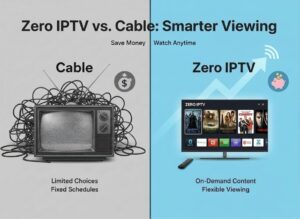
The biggest gap between IPTV and cable is the monthly cost.
Cable TV prices have risen steadily over the past few years, and many customers now pay far more than they expected. In both the US and Europe, a typical cable bill often includes:
-
Base package: $80 to $100
-
HD, sports, or premium add-ons: $20 to $40 extra
-
Equipment rental and service fees: $10 to $20 extra
That means many households end up paying $120 per month or even more.
Annual Cost Estimate
-
Traditional Cable TV: around $1,440 per year
-
IPTV with IGIPTV Premium: around $74 per year
That’s a potential saving of more than $1,300 every year.
Feature Comparison
Is IPTV Lower Quality Than Cable?
This is one of the most common misconceptions.
With a stable internet connection, IPTV can deliver picture quality that is just as good as — and often better than — cable, especially for live sports and 4K streaming.
When buffering happens, the issue usually is not the Firestick or the TV itself. In most cases, it comes down to one of these two problems:
-
Weak or poorly configured Wi-Fi
-
Overloaded or low-quality IPTV servers
If you’re dealing with lag, freezing, or playback problems, check this guide first:
How to Fix Buffering on Firestick in 2026 (7 Proven Fixes)
It explains how to optimize your device before assuming the problem is your internet or provider.
IPTV for Sports Fans
Sports fans usually pay the highest price with cable.
Want football? That’s an extra package.
Want NBA or NFL? Another extra package.
Want UFC, boxing, or pay-per-view events? That often means paying again.
With IGIPTV, everything is bundled into one subscription.
Included sports content
-
Football: Premier League, La Liga, Serie A, Bundesliga, Champions League
-
US sports: NBA, NFL, MLB, NHL
-
Major events: UFC, Boxing, WWE PPV
No separate sports bundles. No surprise add-on fees.
Reliability and Buffering
A lot of people moving from cable to IPTV worry about stability. That’s understandable, but buffering is not always about internet speed alone.
In reality:
-
IPTV works very well on properly optimized devices
-
Most streaming issues are caused by setup problems or overcrowded servers
-
During major live events, performance depends heavily on provider quality and device configuration
If your IPTV stream struggles during important matches or events, it’s worth making sure your Firestick is configured correctly first.
Related guide:
Stop IPTV Buffering on Firestick: Complete Fix Guide for 2026
This article helps you quickly rule out common device and network problems.
Flexibility: IPTV vs Cable
Cable TV usually comes with limitations:
-
One location
-
One TV
-
One rented cable box
IPTV gives you a much more flexible setup.
With IGIPTV, you can stream on:
-
Firestick
-
Smart TVs, including Samsung, LG, and Android TV
-
iPhone and Android devices
-
Tablets and PCs
One subscription, multiple screens, and far fewer restrictions.
Is IPTV Safe and Reliable?
The answer depends entirely on the provider you choose.
The ZeroIptv Promise
-
Secure payments with PayPal and card options
-
Smart server load balancing
-
99.9% uptime infrastructure
-
24/7 real human support
-
Money-back guarantee
The goal is long-term reliability, not short-term sales.
Final Verdict: IPTV or Cable?
Choose cable TV if:
-
You don’t mind paying more
-
You’re fine with long contracts
-
You only need basic local channels
Choose IPTV if:
-
You want better value for your money
-
You watch sports or international content regularly
-
You want to stream across multiple devices without restrictions
Get Instant Access at Zeroiptv.de
Instant setup. No contracts. No unnecessary hassle.
FAQ: IPTV vs Cable TV (2026)
Does IPTV work on Firestick?
Yes. Firestick is one of the most popular devices for IPTV streaming.
Why does IPTV sometimes buffer?
Usually because of Wi-Fi issues, poor device setup, or overloaded servers.
How much internet speed do I need for IPTV?
A stable 20 Mbps connection is generally enough for 4K streaming.
 English
  German
  Dutch
Dutch  Portuguese
  Spanish